Blog · · updated · 5 min read · by Kavisha Wanigasekara
Where each POS stops handling a special order
A special order travels six stages from counter to pickup. Shopify, Lightspeed and WooCommerce each give up partway, and stage 04 (the arrival) fails silently.
- Special orders
- Retail operations
- Point of sale

A special order is something a customer asks for that you don't have in stock and order in for them. It travels six stages, spread over days or weeks, and every system you might run it on gives up somewhere in the middle.
Key Takeaways
- A special order travels six stages: take it, hold it, link the vendor order, catch the arrival, tell the customer, chase it to pickup.
- Read from vendor documentation in September 2026, Shopify POS Pro stops at stage 02, WooCommerce at stage 04, and Lightspeed X-Series at stage 05.
- All three leave at least one of stages 04 to 06 to staff: the half that depends on a person remembering.
- Stage 04, catching the arrival, fails silently: the goods are in the building and nothing looks wrong until the customer calls.
What are the six stages of a special order?
Six things have to happen between a customer asking for something you don't have and that customer walking out with it.
- Take it at the counter. Capture the request while the customer is standing there.
- Hold it with no stock. The order exists before the goods do, so something has to represent it, often with a deposit taken against it.
- Link the vendor order. Connect what you promised a customer to what you ordered from a supplier.
- Catch the arrival. A carton lands with thirteen pairs in it. One belongs to someone who has been waiting three weeks. Harder still when the vendor ships the order short, because then there is not enough to go round.
- Tell the customer. The step that turns a fulfilled order into a happy one, and the one most often forgotten. When the news is a delay instead, it is a harder call to make.
- Chase it to pickup. An order sitting in the back room is not finished.
Stages one to three are paperwork. Four to six are memory. That split explains most of what goes wrong.
Where does each POS stop?
Each of the three systems below carries the early stages and hands back a later one. The table reads left to right in the order a real order travels.
| Stage | Shopify POS Pro | Lightspeed X-Series | WooCommerce |
|---|---|---|---|
| 01 Take it at the counter | Yes (Pro tier) | Yes | Yes |
| 02 Hold it with no stock | No | Yes | Yes |
| 03 Link the vendor order | No | Yes (beta) | No |
| 04 Catch the arrival | No | Partial | No |
| 05 Tell the customer | Yes | No | No |
| 06 Chase it to pickup | Yes | Yes | No |
The line turns red at 02 for Shopify POS Pro, 04 for WooCommerce, and 05 for Lightspeed X-Series. Every one of them hands part of the memory half back to a person.
These verdicts are read from each vendor's published documentation as of 17 September 2026, with the quoted wording and caveats shown on the full POS comparison. Features a vendor marks beta may differ by account and plan. Product names and logos are trademarks of their respective owners. Autofy is not affiliated with, endorsed by, or sponsored by Shopify, Lightspeed, or WooCommerce.
The three stopping points, in each vendor's own words:
- Shopify POS Pro, stage 02. Shopify's documentation states that by default, pickup in store is available only when the entire order is in stock at the pickup location (Shopify Help Center, "Setting up pickup in store for online orders"). A vendor is not one of your locations, so an order you have not received yet cannot be held this way.
- WooCommerce, stage 04. The backorder setting named "Allow, but notify customer" shows a notice on the product page, cart, checkout, order and customer emails, all at purchase time (WooCommerce, "Product Editor settings"). Nothing fires when the goods actually arrive.
- Lightspeed X-Series, stage 05. Lightspeed's special orders documentation instructs staff to contact the customer to let them know the order is ready for collection (Lightspeed Retail X-Series, "Fulfilling items and completing unfulfilled sales"). That step is left to a person.
Why is stage 04 the expensive one?
Because when stage 04 fails, nothing looks wrong. The goods are in the building. The vendor invoice is paid. The POS shows stock on hand. The only missing thing is the link between that carton and the customer waiting for it, and that link lived in somebody's head.
The order never appears as late. It appears as a phone call, three weeks later, from a customer who is no longer happy.
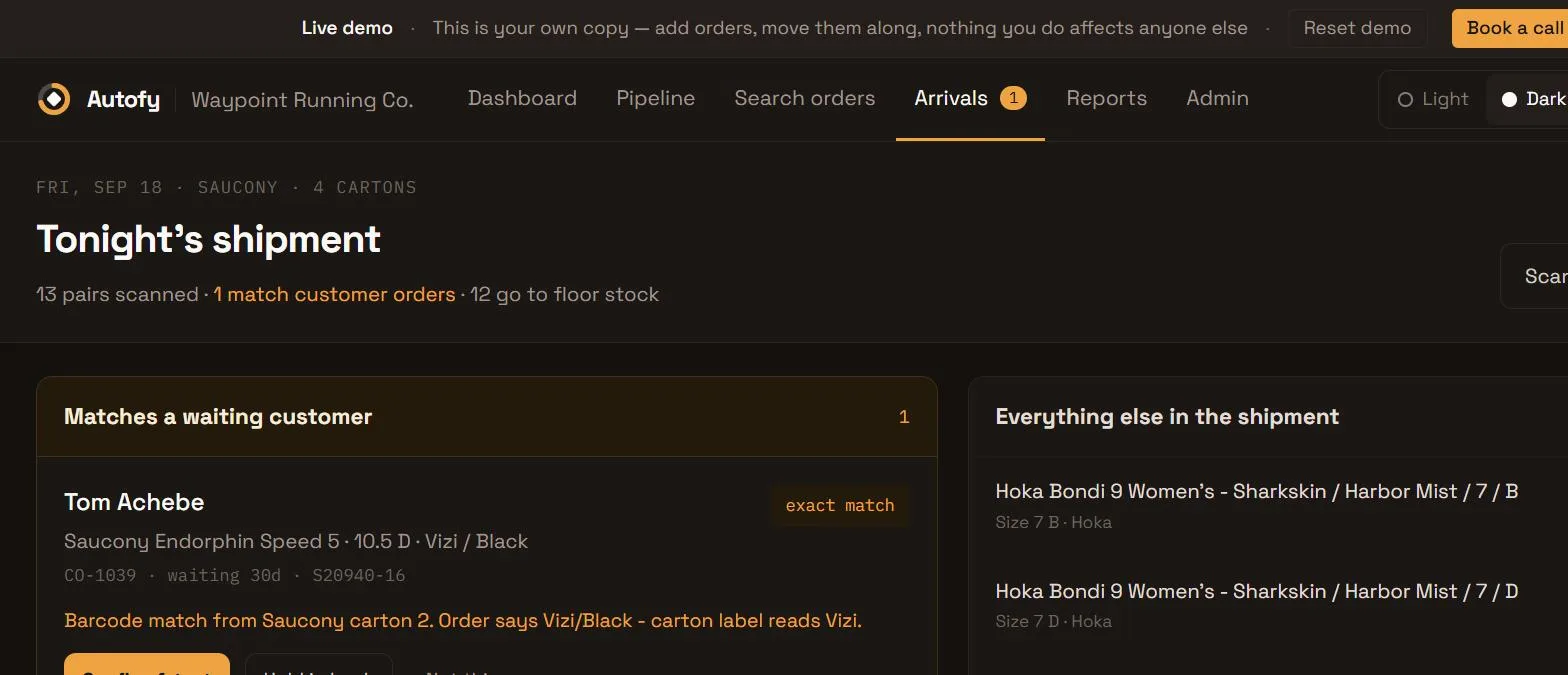
Stage 04 is a matching problem. The question to answer is "whose is it", and a receiving workflow built around stock levels never asks it.
That is why "our POS handles special orders" can be true and still leave you exposed. It handles the stages that generate paperwork. It doesn't handle the one that requires someone to notice.
How do you tell if this is costing you?
You don't need software to find out. Take your last twenty special orders and ask three questions:
- At which of the six stages did a person have to remember something?
- How many are past their promised date right now?
- Who would notice if one had sat in the back room for a month?
If the answer to the third is "nobody, until the customer calls," your gap is stages four to six. That is a process problem before it is a software problem, and naming the failing stage is most of the fix.
Frequently asked questions
Does my POS already do this?
Partly. All three systems above take the order at the counter, and two of the three hold it without stock. The differences start at stage 03 and widen after that. Check your own system against the six stages rather than against the phrase "special orders" in a feature list. For dedicated tools that go further, see the best special order software for retailers.
What is the difference between a special order and a backorder?
A backorder is stock you already carry that ran out. A special order is bought for one named customer, which is why stage 05 matters: nobody is waiting on a backorder by name. The longer answer, pre-orders included, is in special order vs backorder vs pre-order.
Is stage 03 worth solving on its own?
Rarely. Linking the vendor order helps, but if stage 04 still hands back to memory, the order can still go quiet after it arrives. The stages fail as a chain.
What carries stages four to six
Autofy's Order Tracker follows an order through all six stages, and the same board handles backorders, repairs and layaway orders too. If you want to see it against your own open orders, send us a few and we'll walk through them. Whatever you run, naming the failing stage is most of the fix.