READ FROM THEIR OWN DOCS
Special orders in Shopify, Lightspeed and WooCommerce, compared
A special order travels six stages. Green is the stage the system carries on its own. Red is the stage it hands back to somebody's memory. Find your logo and see where the line turns red.
Last updated 1 October 2026 · vendor docs read 17 September 2026
Shopify POS Pro rings a pickup order at the register and turns red at stage 02, because pickup in store needs the entire order in stock at that location; its stages 05 and 06 are real and good but reachable only for click-and-collect. WooCommerce holds a backorder at 02 and turns red at 04: no restock or arrival event exists in core. Lightspeed X-Series is green through 01 to 03, partial at 04, and turns red at 05, where the documentation asks the shop to contact the customer. Autofy is green for all six stages.
Which of the six stages each system handles on its own
Every note below is the vendor's own documentation, quoted or paraphrased.
Shopify POS Pro
line turns red at 02
- 01take it at the counter: at the register, POS Pro tier only
- 02hold it with no stock: “pickup in store is available only when the entire order is in stock at the pickup location” (a vendor is not one of your locations)
- 03link the vendor order: purchase orders aren't tied to the customer's order
- 04catch the arrival: nothing links receiving to a waiting order
- 05tell the customer: one-tap “Send notification”, email and text
- 06chase it to pickup: a pickup queue staff work through
Stages 05 and 06 are real, and out of reach: this pair works only for click-and-collect, which stage 02 has already ruled out for a special order.
Lightspeed X-Series
line turns red at 05
- 01take it at the counter: rung at the register as a normal sale
- 02hold it with no stock: an unfulfilled sale holds the line
- 03link the vendor order: the Special orders page nets demand against inbound vendor orders, best of the three here (beta)
- 04catch the arrival: a prompt, only while receiving (once, to whoever is receiving)
- 05tell the customer: “Contact the customer to let them know … the order is ready for collection”
- 06chase it to pickup: pickup queue, but no “customer contacted” event
WooCommerce
line turns red at 04
- 01take it at the counter: it is a website, not a counter
- 02hold it with no stock: backorders work, “On back order”, or Allow back orders
- 03link the vendor order: purchase orders are a paid third-party extension
- 04catch the arrival: no arrival notification, anywhere (no restock or arrival event exists in core)
- 05tell the customer: none of the 14 core emails covers arrival; low-stock alerts go to the store manager
- 06chase it to pickup: nothing holds the order after it is placed
Autofy Order Tracker
green all six stages
- 01take it at the counter: written at the counter in seconds, in stock or not
- 02hold it with no stock: deposit and balance owing tracked from the moment it is promised
- 03link the vendor order: every waiting customer attached to the vendor order and the expected date
- 04catch the arrival: triggers on the 0 → in-stock change at the shop that received it
- 05tell the customer: the customer is emailed automatically on arrival, in your store's name
- 06chase it to pickup: stays on the board with its age showing until it leaves the shop
Stage 04, the one they all drop
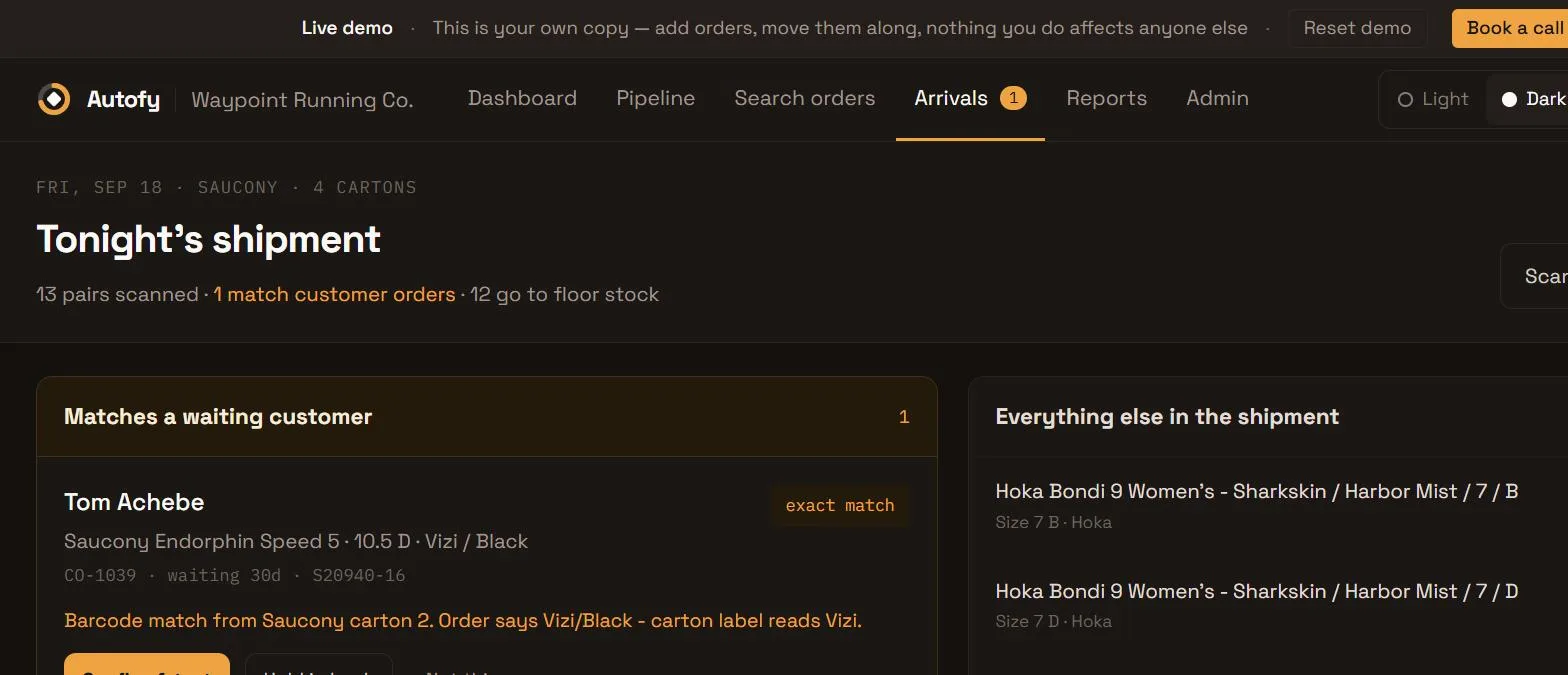
Catching the arrival is where two of the three systems above hand the order back to somebody's memory. This is that moment in Autofy: a carton is scanned, and the one pair in it that belongs to a waiting customer is picked out of thirteen.
All six stages on one board
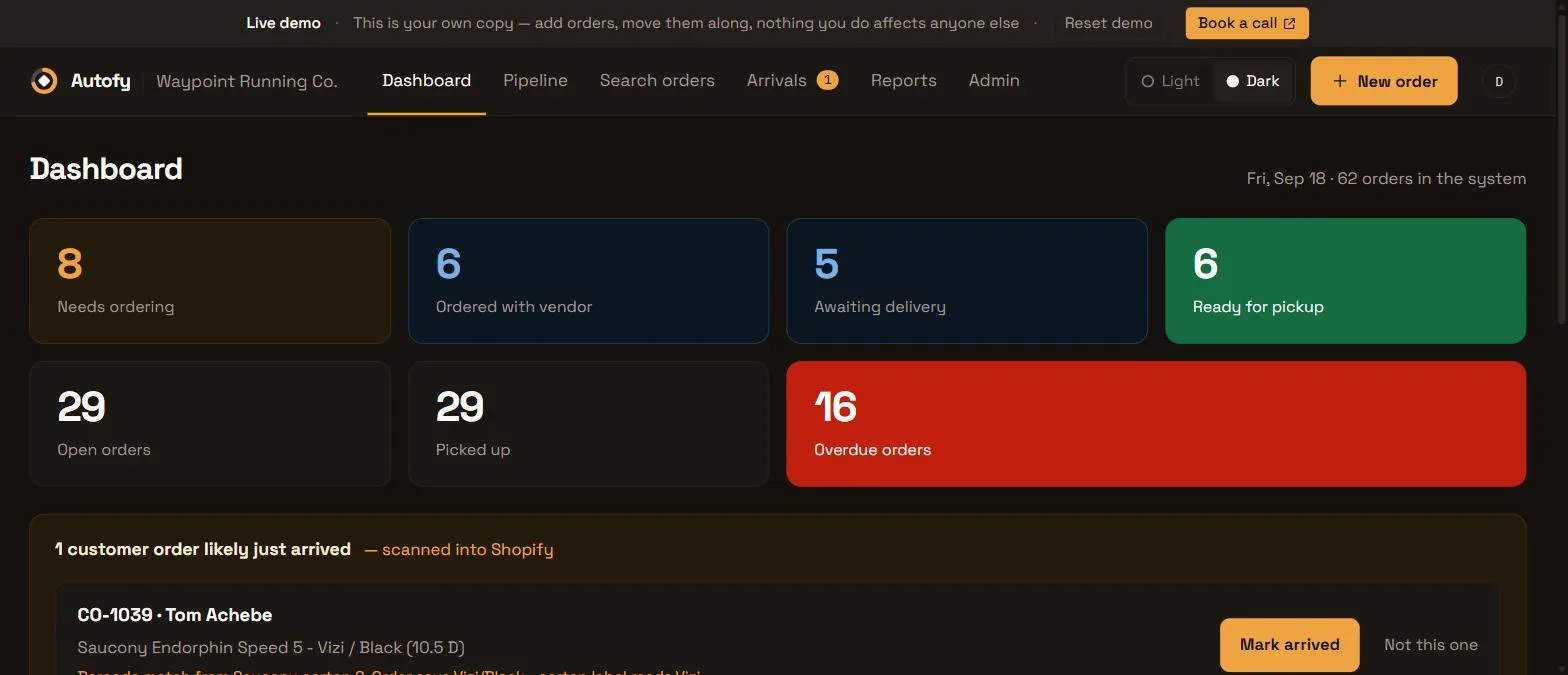
Every special order in the shop, grouped by the stage it is actually at, with the overdue ones impossible to miss.
And three things none of them do
Not extra stages, just the parts of a special order that live in someone's head today.
01
A page the customer can check themselves
Every order gets its own private link. “Order placed with the supplier.” “It's here, come and get it.” No login, no app, no phone call to the shop.
02
Deposits, not paid in full
Take 50% at the counter like you already do. Lightspeed cannot mark an order packed until it is paid in full, unless the sale is put on account.
03
An order that gets louder the longer it sits
Arrived four days ago and nobody called? That is a flagged row, not a thing someone has to remember.
See the six stages running end to end.
Tell us how special orders move through your shop today, and we'll walk you through the tracker on a call. No cost, no pressure.
Sources and caveats
Read from each vendor's published documentation, 17 September 2026. Features their vendors mark beta (Lightspeed's Special orders page and partial fulfillment) may differ by account and plan.
WooCommerce's setting named “Allow, but notify customer” only shows a notice at purchase time, not on arrival. In Lightspeed, an unfulfilled sale must be paid in full before it can be marked packed or picked up (a sale put on account counts as paid), and the page tells staff to contact the customer themselves when the order is ready for collection.
Product names and logos are trademarks of their respective owners. Autofy is not affiliated with, endorsed by, or sponsored by Shopify, Lightspeed, or WooCommerce.